What it does
Play something on the pads with the sequencer stopped, press SHIFT+OVERDUB, and it's in the sequence: tempo detected, loop length set and playing back. It works like Capture MIDI in Ableton Live, using the notes MPC already keeps for its Retrospective Record.
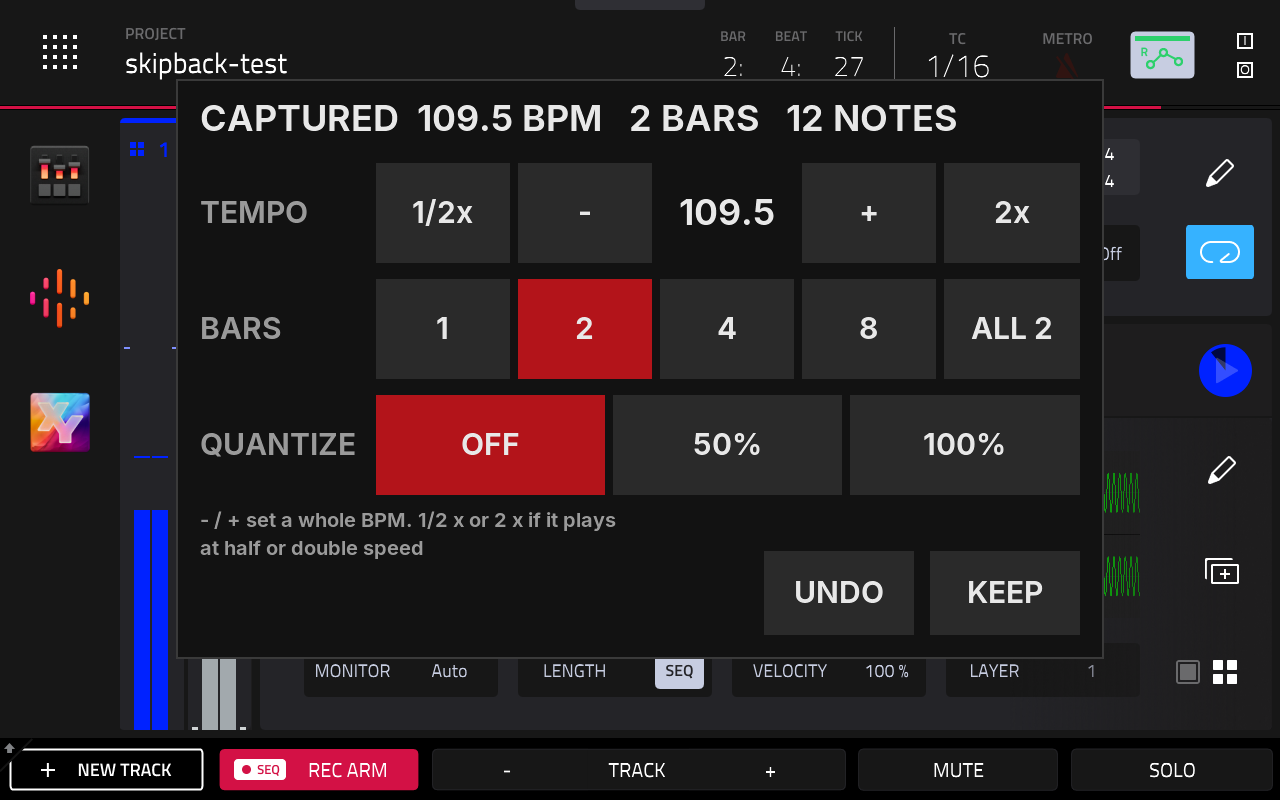
On a new idea (stopped, empty sequence) it detects the tempo, preferring 70 to 140 BPM and keeping decimals like 87.6, and finds a 1, 2, 4 or 8 bar loop. It sets both, puts the phrase in from bar 1, starts playback and shows a panel to adjust the result.
When the sequence is playing or already has notes, the tempo is left alone and there's no panel. The last sequence length of your playing goes in, in time, on top of what's there.
One MPC undo removes a whole capture.
How to use it
- Play a phrase on the pads.
- Press SHIFT+OVERDUB.
- On a new idea, adjust on the panel while it loops. Every change applies at once:
- Tempo: −/+ one BPM, or ½× and 2×.
- Bars: 1, 2, 4, 8 or ALL.
- Quantize: off, 50 % or 100 %, using MPC's Timing Correct value.
- UNDO takes back everything, including the playback it started. KEEP closes the panel.
SHIFT+ERASE empties the capture buffer, so a fresh take doesn't include what you played before it. The panel also closes (as KEEP) when you change track or sequence, press REC or OVERDUB, or undo. It doesn't block the screen: touches outside it go to MPC.
Settings
In midi-capture.conf:
| Setting | Default | What it does |
|---|---|---|
tempo_min |
70 |
Detected tempos are preferred from here... |
tempo_max |
140 |
...up to here (BPM). |
quantize_grid |
16 |
Grid for quantize (16 = 1/16, 8 = 1/8), only used if MPC's Timing Correct value can't be read. |
panel_flip |
0 |
1 if the panel shows upside down. Needs an MPC restart. |
capture |
1 |
0 makes SHIFT+OVERDUB stock again. |
enabled |
1 |
0 turns the mod off. Needs an MPC restart. |
Diagnostics: log, dump, probe.
How it works
When SHIFT+OVERDUB starts MPC's Retrospective Record, the mod steps in. It reads the notes MPC kept, works out the tempo and loop length, places the notes on the grid and lets MPC insert them with its own code, together with the tempo and length change, as one undo step. Everything runs on MPC's own thread, the same way its Retrospective Record does.
The panel is drawn on its own display layer above MPC's screen, at the same spot as MPC's own popups, and its touches are kept from MPC. That layer is also why ordinary MPC screenshots don't show it, so the picture on this page is a composite. Only 4/4 and MPC 3.10.0 are supported. Clip mode and tracks without a program keep the stock behaviour.
The panel's design is borrowed from NervousCook$, who shows the same panel in his own Capture MIDI mod in the video I Hacked My MPC With Claude A.I.